
Kategorien
Amazon MWS PHP PHP 7 Projekte Symfony

Amazon automatische Preisanpassung Tool

Für einen Kunden habe ich gerade ein Tool entwickelt, mit dem man die Preise der eigenen Waren bei Amazon automatisch anpassen kann.Dabei werden die Angote der Konkurrenz analysiert nach Zustand der Ware und nach Seller Seriösität und dadurch ein fairer Preis bestimmt für die Ware. Es werden alle Daten, die über die API verfügbar sind für die Preisbestimmung mit herangezogen, wie z.B. Seller Feedback (Bewertungen des Händlers), ob Amazon selber verschickt, Versanddauer und vieles mehr.

Das Tool vergleicht optional die Preise zwischen den verschiedenen Amazon Plattformen in Europa (DE, UK, IT, ES, FR) aber auch Plattformen außerhalb Europas, wie Japan oder Amerika und händelt die unterschiedlichen Währungen.

Das Ergebnis kann direkt zu Amazon mittels der API geschickt werden und die Preise werden sofort geupdatet.
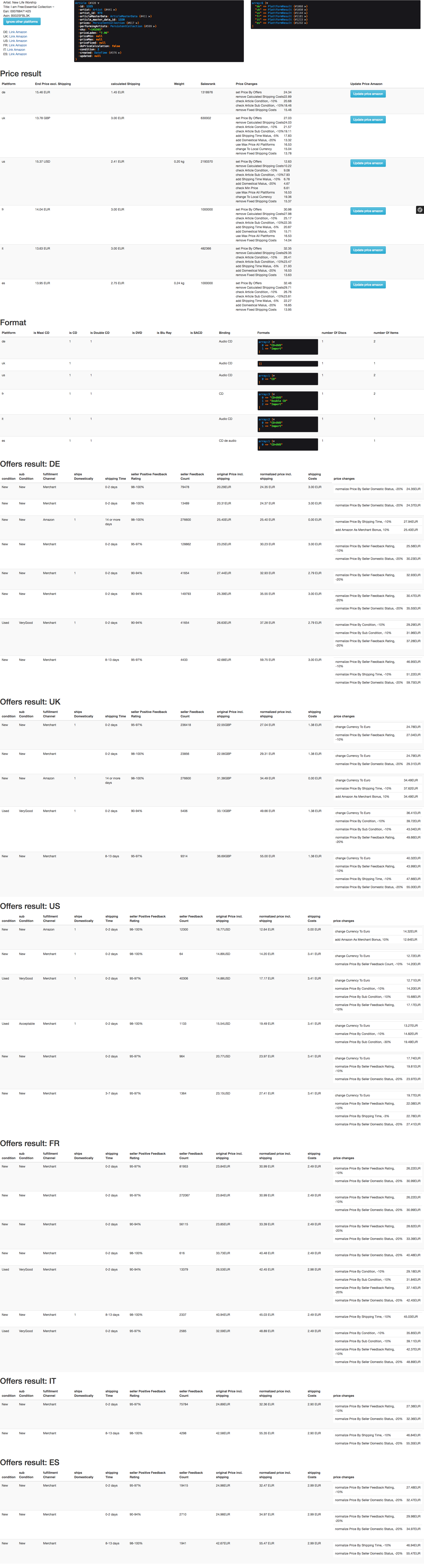
Amazon Preisanpassung
Screenshot Preisanpassungs Tool


Die Anwendung ist in PHP mit Symfony 3 geschrieben und hat ein Frontend mit Twitter Bootstrap 3 und eine MySQL Datenbank. Außerdem gibt es eine Vagrant Umgebung für die Entwicklung mit PHP7.1 und nginx. Ausgeführt werden kann das ganze mit einer einfachen Xampp Umgebung oder Vagrant Virtual Box beim Kunden lokal auf einem PC.

Falls sie auch Interesse an einem solchen Tool haben, könnne sie gern Kontakt aufnehmen.

Kategorien
Amazon MWS PHP

Amazon MWS PHP: Compile Error: Redefinition of parameter $quotaMax

Die Amazon MWS Library hat zu Recht Probleme in PHP7.1 mit der Datei: /MarketplaceWebServiceProducts/Model/ResponseHeaderMetadata.php (line 31)

Vorher:

class MarketplaceWebServiceProducts_Model_ResponseHeaderMetadata {

...

  public function __construct($requestId = null, $responseContext = null, $timestamp = null,
                              $quotaMax = null, $quotaMax = null, $quotaResetsAt = null) {
    $this->metadata[self::REQUEST_ID] = $requestId;
    $this->metadata[self::RESPONSE_CONTEXT] = $responseContext;
    $this->metadata[self::TIMESTAMP] = $timestamp;
    $this->metadata[self::QUOTA_MAX] = $quotaMax;
    $this->metadata[self::QUOTA_REMAINING] = $quotaMax;
    $this->metadata[self::QUOTA_RESETS_AT] = $quotaResetsAt;
  }

Nach dem Fix:

public function __construct($requestId = null, $responseContext = null, $timestamp = null,
                            $quotaMax = null, $quotaMaxRemain = null, $quotaResetsAt = null) {
  $this->metadata[self::REQUEST_ID] = $requestId;
  $this->metadata[self::RESPONSE_CONTEXT] = $responseContext;
  $this->metadata[self::TIMESTAMP] = $timestamp;
  $this->metadata[self::QUOTA_MAX] = $quotaMax;
  $this->metadata[self::QUOTA_REMAINING] = $quotaMaxRemain;
  $this->metadata[self::QUOTA_RESETS_AT] = $quotaResetsAt;
}

Grund ist, dass die Variable $quotaMax doppelt benutzt wird in der Kontrultor Definition.


Kategorien
Webdeveloper Tools

Wie kann ich meine Maus und Tastatur auf mehreren Computern benutzen?

Die Antwort ist Synergy damit kann man auch Betriebsystemübergreifend einen anderen Computer steuern, ohne die Maus/Tastatur umstecken zu müssen. Funktioniert unter Mac, Linux und Windows.

Kategorien
Server Administration Webdeveloper Tools

Linux vergleichen von Dateien innerhalb eines Ordners auf Dateiänderungen

Mit dem diff   Befehl unter Linux kann man sehr einfach herausfinden, welche Unterschiede es in zwei scheinbar identsichen Ordnern gibt.

Ein Anwendungsbeispiel wäre z.B. 2 Projekte miteinander zu vergleichen und die Unterschiede im Code herauszufinden.

#Ausgabe auf der Console stdout
diff -qr \
--exclude="css" \
--exclude="tmp" \
/myMaster/folder /mySlave/folder


#Pipen der Ausgabe in eine Datei oder less:
diff -ur \
--exclude="css" \
--exclude="tmp" \
/myMaster/folder /mySlave/folder | /tmp/diff.txt
Kategorien
MySQL

MySQL ProcessList unter Linux beobachten

Wenn man die Process List von MySQL sich ständig aktualisiert anzeigen lassen will, kann man den watch Lionux Befehl auf der Console dafür benutzen. Login, Host und Passwort müssen ggf. geändert werden:

watch -n 1 "mysql -u root --password='myPassword' -h localhost -s -e 'SELECT * FROM INFORMATION_SCHEMA.PROCESSLIST WHERE 1 = 1;'"
Kategorien
Webdeveloper Tools

Jira Template für Request und Response für Backend

Man kann in Jira mit diesem Template leicht eine wohlformnatierte Request / Response zaubern:

{panel:title=Request}
    {code:xml}
       myRequest here
    {code}
{panel}

{panel:title=Response}
    {code:xml}
      myResponse here
    {code}
{panel}
Kategorien
Ansible Server Administration

PHP7 mit Ansible installieren

Mit Ansible kann man sehr einfach alle PHP7 von Ondrej’s Respository installieren mittels der Befehle:

- name: Remove old PHP7 ppa repository
  apt_repository: repo='ppa:ondrej/php-7.0' state=absent

- name: Add PHP7 ppa repository
  apt_repository: repo='ppa:ondrej/php'

- name: Install packages
  apt: pkg={{ item }} state=latest update_cache=yes
  with_items:
   - mysql-client
   - nginx
   - php7.0-cli
   - php7.0-fpm
   - php7.0-dev
   - php7.0-curl
   - php7.0-gd
   - php7.0-mbstring
   - php7.0-mcrypt
   - php7.0-mysql
   - php7.0-soap
   - php7.0-sqlite3
   - php7.0-xml
   - php7.0-zip
   - php7.0-bcmath
   - php7.0-ssh2
   - php-rrd
   - git
   - zlibc
  tags:
   - php
Kategorien
PHP PHPUnit Testing Webdeveloper Tools

Run PHPUnit Unit and Integrations test with different configurations in PHPStorm

If you want to develop unit and integration tests with PHPStorm you can easily bootstrap your application and run your tests. But if you want to develop real unit tests in your local development enviroment without having a database connection or a cache, you need to make sure, that your application is configured differently, when unit tests are running. In this article you will learn how to do that and how to make PHPStorm will automatically recognize which tests/tests suites you want to execute.

Requirement:

Your integration and unit tests are seperated in 2 directories, like:

/tests/unitTests
/tests/integrationsTests

Overview

Kategorien
Elasticsearch PHP

Elasticsearch Subquery Scoring Optimization

If you want to build a search query in Easticsearch where you can give documents a bonus score depending on how often a property can be found in other documents

– you need is a Subquery which is not supported by Elasticsearch, you need another better solution.

An Example for a Subquery is the problem:

Imagine a CD online shop. You want to score CDs ( = documents) higher which

1. match a term query AND

2. and which artist has many other CDs in your shop database

You would need a field, which aggragts the artist count in your mapping (artistCount for Example) and on query time and boost the artistCount field with the score:

{
    "query" : {
        "custom_score" : {
            "query" : {
                "match_all" : {}
            },
            "script" : "_score + (1 * doc.artistCount.integerValue)"
        }
    }
}

It would be also a good idea, to have a second index, which holds the artistCount information, because on every update of the inventory of your shop, the artsitCount needs to be recalculated.


Kategorien
PHP PHPUnit Testing

PDOException: You cannot serialize or unserialize PDO instances

Beim Mocken von Objekten mit PHPunit kann es zur Fehlermeldung:

PDOException: You cannot serialize or unserialize PDO instances

kommen, immer dann, wenn im Constructor eine PDO Instanz injeziert wird. Dies kann unterbunden werden durch:

class PDOMock extends PDO{
    public function __construct(){}
}